
ABOUT GBC
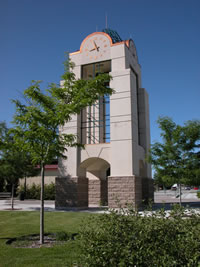
Welcome to Great Basin College!
Great Basin College wants to be your choice for higher education. GBC offers associate and baccalaureate level instruction in career and technical education and academic areas. About 4,000 students are enrolled annually online from across the country and on campuses and centers across 86,500 square miles, two time zones, and ten of Nevada's largest counties. We border Arizona, Oregon, Idaho, Utah, and California. We are GBC!
We are GBC!
ADMISSION TO GBC

ACADEMICS AT GBC

For High School Students
CTE College Credit Program
High School/Dual Enrollment
High School FAQ
High School Students
STUDENT SERVICES

GBC ONLINE

As part of Great Basin College's mission of transforming lives through education, GBC offers hundreds of online classes and several certificate and degree programs. See our current catalog for more information.
COMMUNITY
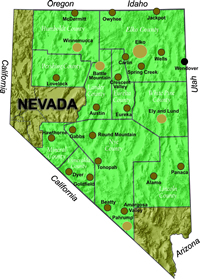
Great Basin College wants to be your choice for higher education. GBC offers associate and baccalaureate level instruction in career and technical education and academic areas. About 4,000 students are enrolled annually online from across the country and on campuses and centers across 86,500 square miles, two time zones, and ten of Nevada's largest counties. We border Arizona, Oregon, Idaho, Utah, and California. We are GBC!
FIND INFORMATION

Need to find COVID-19 information quick? Check out our Coronavirus (COVID-19) Information and Resources page!

RESOURCES


Google Tools
Google offers a tremedous variety of powerful tools to make us more efficient and effective. Help and tutorials on a few favorites are listed below. All require a GBC account on Google, and then you have access to all the Google resources listed here. All of these tools are free.
Once you create a BLOG or a Calendar, you can link to it from your Faculty page, Degree Program page, or Department page. You can also ask the webmaster to post a link to your calendar or BLOG anywhere else on the website that seems fitting, your committee's page, for example.
Gmail
Google Gmail is a powerful web-based e-mail client that provides many tool to compose, and maintain all your e-mail communications!
- Gives you an enormous amount of storage.
- Keep all your e-mail and attachments for years.
- Search for e-mail instantly by any number of criteria, using the power of Google.
- Because of the power of search, you never have to file or organize your mail.
- Keep it all available in one place. Keep conversations grouped together, automatically.
Check out tips on how to best use Gmail!
Google Calendar
Leverage the power of Google Calendar to assist in creating, planning, and managing your meetings, events, and tasks.
- Create calendars for your self, your committee, and/or your department
- Share your calendars with others, providing explicit permissions to change, to view, or to simply see your busy times.
- Optionally make a calendar available for public viewing on the web, showing either all events or just free/busy times.
- Set up your whole department with calendars so that the support staff person can see everyone's busy times from a single calendar.
- Optionally, have your cell phone beep you before events, or just receive email reminders.
Get started with Google Calendar.
Google Blogger
Express yourself as an individual or collaborate as a group by creating your own blog with Google Blogger. Visit Google's Blogger tutorial online.
Google Groups
To create a discussion forum, private or public, or a mailing list for your group, check out Google Groups.
For More Information Contact
Technology Help Desk
Great Basin College
Phone: 775-327-2170
E-mail: helpdesk@gbcnv.edu
Why Great Basin College
Great Basin College offers associate and baccalaureate level education in academic, career and technical fields. Welcoming students from all corners of the country, both online and at our various campuses and centers, GBC's presence extends across two time zones and spans more than 86,000 square miles throughout Nevada. A leader in rural higher education, GBC takes pride in developing students who are well-prepared to meet the demands of industry and who contribute to the success and prosperity of the local economy.